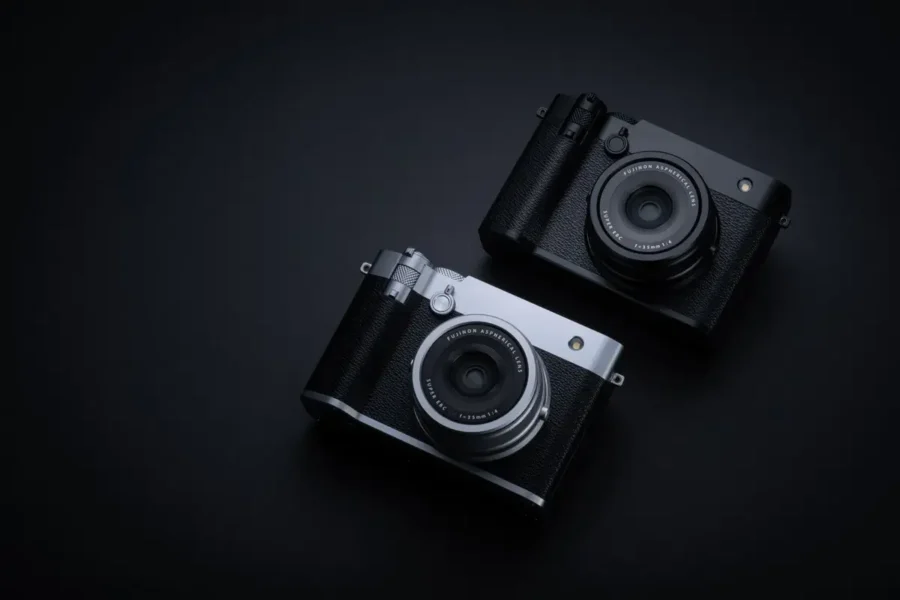
Fujifilm has released firmware version 1.14 for the Fujifilm GFX100RF, its fixed-lens medium format camera. Published on November 4, 2026, this release arrives as a focused maintenance update aimed at keeping overall system stability and day-to-day operational reliability in top shape for photographers working with the 102MP medium format body.
While version 1.14 does not introduce new shooting modes, film simulations, or autofocus features, it builds directly on the stability work seen in earlier 2026 releases. For shooters exploring how this fixed-lens compact fits alongside interchangeable-lens bodies in the broader lineup, our Fujifilm GFX Medium Format System Guide breaks down the entire ecosystem across Fujifilm medium format cameras.
Version, Compatibility & Prerequisites Note: Firmware Ver. 1.14 applies specifically to the Fujifilm GFX100RF (including the GFX100RF Fragment Edition). You can update directly from any older firmware version without installing intermediate releases first. Before starting, ensure you have a fully charged NP-W235 battery, a freshly formatted memory card, and note that updating takes roughly 5 minutes maximum—also keep in mind that after updating, Bluetooth pairing requires Android/iOS devices with Bluetooth Ver. 4.2 or later (FUJIFILM Camera Remote on Bluetooth 4.1 or earlier and direct printing to instax SHARE SP-1/2/3 printers are no longer supported).
What’s New in Fujifilm GFX100RF Firmware Ver. 1.14
According to Fujifilm’s official release notes, version 1.14 is strictly a maintenance patch following June’s version 1.13 update (which resolved a Bluetooth reconnection issue on the GFX100RF Fragment Edition with the FUJIFILM XApp after power cycling):
- Minor Bug Fix: Incorporates a fix for a minor operational bug carried over from Ver. 1.13 to improve overall camera reliability.
- Cumulative Firmware Base: Includes all previous stability patches and wireless connectivity refinements from Ver. 1.13 and Ver. 1.12.
- No New Features Added: User interface layouts, custom film simulation recipes, and core imaging controls remain unchanged.
To verify your current firmware version (hold the DISP/BACK button while turning the camera on) and download the official FWUP0036.DAT update file, visit the official Fujifilm GFX100RF Support & Firmware Download page. Refresh the support page in your browser before downloading to confirm you are viewing the latest Ver. 1.14 package, and ensure no duplicate firmware files exist in your computer’s download folder—if your browser renames the file (such as adding (1)), the camera will not recognize it.
How to Install Firmware Ver. 1.14 on the Fujifilm GFX100RF
Updating the GFX100RF takes only a few minutes using a standard SD card and card reader:
- Check Current Version & Charge Battery: Hold down the DISP/BACK button and power on the camera to confirm your current version is older than Ver. 1.14, then insert a fully charged battery.
- Format a Memory Card in Camera: Insert an SD card into the GFX100RF and format it via SET UP > USER SETTING > FORMAT (back up any existing photos first, as formatting erases all data).
- Copy the Firmware File: Power off the camera, insert the formatted SD card into your computer, and copy the downloaded
FWUP0036.DATfile directly to the root directory (top level) of the card—not inside any subfolder. - Run the In-Camera Update: Insert the SD card into Slot 1 of the GFX100RF, hold down the DISP/BACK button while turning the power switch ON, and select OK to begin updating the body firmware.
- Complete & Restart: Once the screen confirms that the firmware update is complete, switch the camera off, remove the SD card, and reformat the card in-camera before resuming normal photography.
Important Safety Warning: Never turn off the camera, open the battery or memory card door, or press any buttons while the firmware update is in progress. Interrupting power or removing the SD card during installation can corrupt the system software and require factory service.
Should You Update to Version 1.14?
Even though Fujifilm has not publicly detailed the exact nature of the minor bug addressed in version 1.14, installing maintenance updates is good practice for any camera you rely on for paid assignments or travel. Silent stability fixes frequently resolve rare freeze states, card-write hiccups, or wireless handshaking glitches before they interrupt a shoot.
The only reason to hold off briefly is if you are currently in the middle of a multi-day assignment or client shoot—in that case, wait until your files are safely backed up and you have downtime at home to perform the update cleanly with a fresh battery and formatted card.
Price & Availability
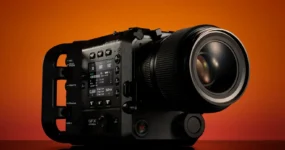
The Fujifilm GFX100RF remains widely available across authorized photography retailers, alongside flagship interchangeable-lens medium format options—including recent seasonal savings covered in our Fujifilm Black Friday Deals 2026 tracker and cinema-oriented releases like the Fujifilm GFX ETERNA 55. You can check current stock, bundles, and accessories for the GFX100RF at major authorized dealers below:
Summary
Fujifilm’s firmware version 1.14 for the GFX100RF is a straightforward maintenance release focused on squashing a minor bug and maintaining dependable everyday performance. While it brings no headline features beyond June’s Ver. 1.13 XApp connectivity patch, taking five minutes to install it with a fully charged battery and freshly formatted SD card keeps your fixed-lens medium format compact current and reliable.
Stay tuned for more firmware news and photography updates here on DCN.
Also join the Fujifilm Camera Users Facebook Group to share your Fujifilm photography
Frequently Asked Questions
Will updating the Fujifilm GFX100RF to firmware 1.14 reset my custom settings or Film Simulation recipes?
In most standard Fujifilm body updates like Ver. 1.14, your custom C1–C7 profiles, button assignments, and Film Simulation recipes remain intact. However, it is always smart practice to back up your camera settings using the FUJIFILM XApp before installing any firmware update so you can restore your exact configuration in seconds if a setting ever reverts to default.
Can I update the Fujifilm GFX100RF firmware using the FUJIFILM XApp instead of an SD card?
Yes, if your GFX100RF is paired with the latest version of the FUJIFILM XApp over Bluetooth and Wi-Fi, you can transfer firmware updates wirelessly from your smartphone. That said, copying the .DAT file directly to a freshly formatted SD card via a computer card reader remains the fastest and most foolproof installation method, especially for larger updates.
Can I skip version 1.13 and update directly from an older firmware version to 1.14?
Yes, Fujifilm camera firmware updates are cumulative. Whether your GFX100RF is currently running version 1.13, 1.12, or the original launch firmware, installing version 1.14 automatically incorporates all prior bug fixes and wireless connectivity improvements in a single step.
Why isn’t my GFX100RF recognizing the firmware file on my SD card?
This usually happens for one of three reasons: the FWUP0036.DAT file was placed inside a subfolder instead of the root directory of the card, your web browser automatically renamed a duplicate download (such as FWUP0036 (1).DAT), or the card was inserted into Slot 2 instead of Slot 1. Reformat the card in-camera, verify the exact filename, place it in Slot 1, and hold DISP/BACK while powering on.

See More DCN on Google
Add Daily Camera News as a trusted source to see our latest camera reviews, deal alerts, and photography news first in Google Search.
Explore Recommended Gear
Looking for the best cameras, lenses, and accessories? Check out our curated, hand-picked gear lists on Amazon.