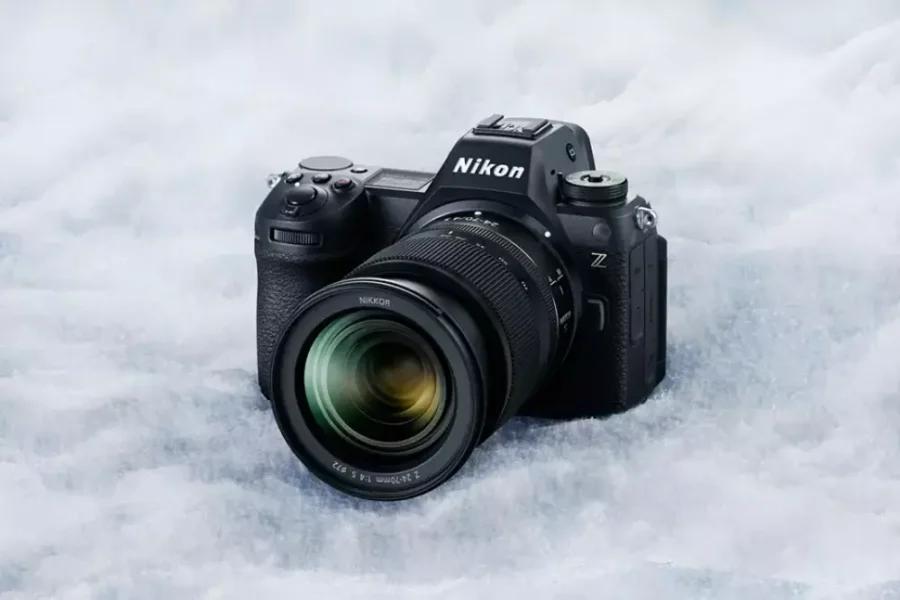
For photographers and videographers operating the high-speed partially-stacked Nikon Z6 III, keeping your camera running on the latest firmware ensures peak performance across both native Z-mount glass and adapted F-mount optics. Nikon has formally deployed Firmware Version 2.01 across its official global download center, bringing practical workflow tweaks and fixing rare exposure and responsiveness bugs encountered in demanding shooting scenarios.
Unlike minor stability patches, Version 2.01 introduces functional enhancements—including Bluetooth remote trigger capability for Pre-Release Capture and expanded focus limiter support across eight popular zoom lenses—while resolving critical operational issues during burst shooting and pixel shift modes. Below is our complete, in-depth technical breakdown of everything included in this official release, direct links to Nikon’s download portal, and a step-by-step installation guide.
Quick Summary: Official Changes in Firmware Version 2.01
Here is an overview of the core updates, feature renames, and bug fixes included in the official release notes for Firmware Version 2.01 (updating from Version 2.00):
| Category / Focus Area | Official Firmware Version 2.01 Modifications |
|---|---|
| Remote Controls | Pre-Release Capture is now available when triggered via compatible Bluetooth remote controllers. |
| NIKKOR Z Focus Limiters | Added support for custom focus limiter settings across 8 NIKKOR Z lenses (DX and FX zooms). |
| Picture Control Terminology | Renamed [Cloud Picture Control] to [Imaging Recipe] and updated menu download terms. |
| Exposure Fixes (Mode M) | Fixed a rare issue where photos could become overexposed during high-speed burst photography in Manual (M) mode. |
| F-Mount Lens Stability | Fixed exposure instability on Type E lenses, freeze issues during burst shooting, and FV lock flash AF glitches. |
| Pixel Shift & Manual Glass | Fixed pixel shift shot count failures on non-CPU glass and zoom lockups during manual lens subject detection. |
1. Detailed Breakdown of New Features & Menu Changes
A. Bluetooth Remote Pre-Release Capture & Focus Limiter Support
Action and wildlife photographers relying on remote setups can now trigger Pre-Release Capture using compatible Bluetooth remote controllers (such as the Nikon ML-L7). This ensures you never miss a split-second action moment, even when operating the Z6 III from a tripod rig at a distance.
Additionally, Version 2.01 expands in-camera focus limiter support to eight widely used NIKKOR Z optics, allowing shooters to restrict AF hunting distances for faster lock-on:
- NIKKOR Z DX 16-50mm f/3.5-6.3 VR
- NIKKOR Z DX 18-140mm f/3.5-6.3 VR
- NIKKOR Z DX 50-250mm f/4.5-6.3 VR
- NIKKOR Z 24-200mm f/4-6.3 VR
- NIKKOR Z 24-50mm f/4-6.3
- NIKKOR Z 14-24mm f/2.8 S
- NIKKOR Z 24-70mm f/4 S
- NIKKOR Z 14-30mm f/4 S
B. Menu Terminology Shift: “Imaging Recipes”
Aligning with Nikon’s updated cloud ecosystem branding, Picture Control items have been updated throughout the photo shooting and video recording menus. [Cloud Picture Control] is now formally named [Imaging Recipe], and [Add Cloud Picture Control files] has been updated to [Download Imaging Recipes]. Select Custom Settings menu numbers have also been corrected for accuracy.
Search High-Speed CFexpress Type B & SDXC Cards for Nikon Z6 III
Ensure smooth high-speed burst performance and clean file recording with verified media:
Check CFexpress Cards on Amazon
Shop Storage at B&H Photo
Pre-Update Safety Tip: Always verify that your EN-EL15c battery is charged to 100% capacity or power the camera via USB-PD before starting the firmware update process!
2. Comprehensive Bug Fixes for Mode M & Adapted F-Mount Glass
Firmware 2.01 provides critical fixes for photographers utilizing high-speed continuous shooting or adapted F-mount glass via the FTZ / FTZ II adapters:
- Mode M Burst Exposure Fix: Resolves a rare anomaly where continuous burst shooting in Manual (M) exposure mode could result in overexposed frames.
- Type E Lens Burst Exposure: Corrects an issue where exposure would become unstable during high-speed burst photography when using NIKKOR F-mount Type E lenses with electromagnetic diaphragms.
- F-Mount Lockup & Flash AF Fixes: Resolves rare instances where the camera could stop responding during burst shooting with F-mount glass attached, or where autofocus would fail while using FV lock with a speedlite attached.
- Pixel Shift & Manual Glass Stability: Fixes a bug where pixel shift shooting would fail to capture the designated number of exposures with non-CPU lenses, and prevents camera lockups when zooming live view during subject detection on manual lenses.
Search EN-EL15c Batteries & Official Accessories
Keep your Nikon Z6 III supplied with genuine high-output power cells:
Check EN-EL15c Batteries on Amazon
Buy Batteries at B&H Photo
.bin firmware file onto it! In-camera formatting removes hidden system folders and guarantees that the camera detects the firmware file instantly upon turning on the update menu.3. Official Download Center Links & Installation Guide
Nikon strongly recommends that all current Z6 III owners update to Firmware 2.01 to maintain optimal shooting stability. You can download the official update package directly from Nikon’s official global download center:
- Official Download Link: Nikon Download Center (Nikon Z6 III Firmware Version 2.01)
Step-by-Step Installation Walkthrough
- Download the Official Package: Access the Nikon Download Center link and save the Firmware 2.01 file to your computer.
- Extract & Copy the BIN File: Extract the downloaded file to locate
Z6_3_0201.bin. Insert a formatted CFexpress or SD card into your computer card reader and copy the.binfile directly into the root directory (top level) of the card. - Insert Media & Check Power: Insert the memory card into Slot 1 of your Z6 III. Verify that your EN-EL15c battery icon displays a 100% full charge level.
- Navigate to Firmware Menu: Turn the camera ON. Press the
MENUbutton, select the Setup Menu (Wrench Icon), and select Firmware Version. - Initiate Update: Follow the on-screen prompts, select Update, and press
OK. A progress bar will appear on screen. Do not turn off camera power, press buttons, or open memory doors during installation! - Restart & Verify: When the LCD screen displays “Update Complete. Turn Camera Off,” turn the power switch OFF, wait 5 seconds, turn it back ON, and verify in the setup menu that the firmware version now reads C 2.01.
Compare authorized pricing, bundle options, and live stock across top camera retailers:
Search Nikon Z6 III on Amazon | Shop Nikon Bodies at B&H Photo | Browse Gear at Adorama
For broader system coverage, visit our dedicated Nikon news portal, explore all updates on our Nikon Z6 III hub, check out our hand-picked guide to the best lenses for the Nikon Z6 III, review how the Z6 series stacks up in our best Nikon mirrorless cameras roundup, or discover major savings in the Nikon USA fall rebates guide.
Frequently Asked Questions (FAQ)
Frequently Asked Questions About Nikon Z6 III Firmware 2.01
Q: Does Firmware 2.01 support Pre-Release Capture with Bluetooth remotes?
A: Yes! Version 2.01 officially enables Pre-Release Capture triggering when using compatible Bluetooth remote controllers like the Nikon ML-L7.
Q: Is Firmware Update 2.01 cumulative from Version 2.00?
A: Yes, Version 2.01 incorporates all previous maintenance patches, focus enhancements, and features introduced in Version 2.00 and earlier builds.
Q: Can I perform this update wirelessly via the Nikon SnapBridge app?
A: Yes, when paired with the Nikon SnapBridge application on iOS or Android, you can wirelessly transfer and initiate the firmware update directly from your mobile device.