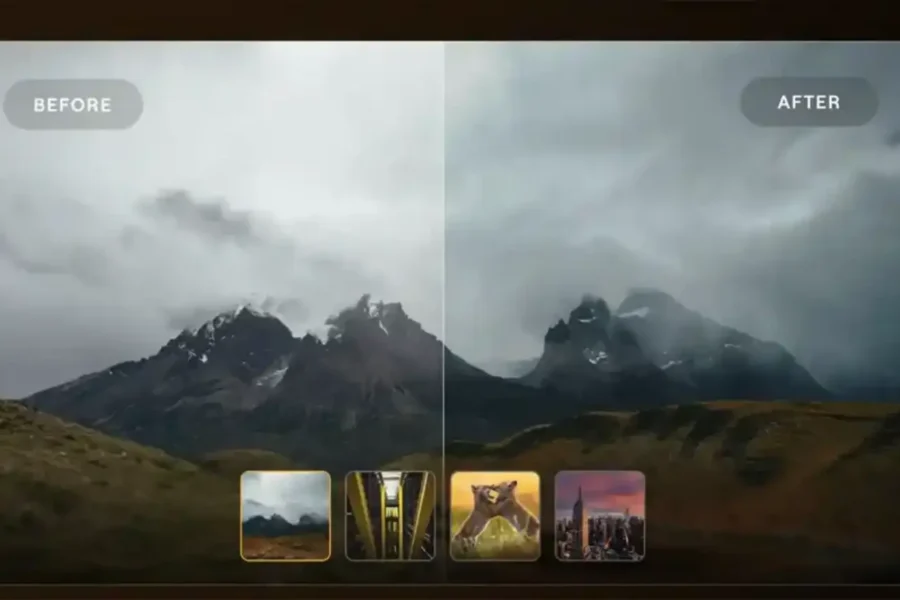
For years, cloud and browser-based photo editing software was largely confined to lightweight filters, basic cropping utilities, and simple JPEG adjustments. Photographers editing complex RAW camera files, attempting non-destructive tone mapping, or applying sophisticated neural AI retouching were forced to rely on heavy desktop hardware running resource-intensive software installations. Skylum is aiming to alter that paradigm with the official release of Luminar on Web.
Launched officially on October 15, 2026, Luminar on Web transitions Skylum’s signature desktop computational tools—including Light Depth technology, GenErase, and automated Sky Replacement—into a lightweight, web-native editing interface. By processing high-resolution RAW files on cloud servers, the platform allows creators to perform professional photo edits on virtually any device with an internet connection, bypassing local storage constraints and hardware specs. Below is our comprehensive overview of features, workflow capabilities, and pricing options. To keep up with overall photo processing developments, explore our camera software directory or check out past software savings in our Luminar sale coverage.
Quick Summary: Key Features & Platform Overview
Here is an overview of the technical capabilities and operational features built into Skylum’s Luminar on Web:
| Feature Category | Luminar on Web Performance & Specs |
|---|---|
| File Compatibility | Full RAW file processing & high-resolution JPEG / TIFF / PNG support |
| Core Technology | Skylum Light Depth Technology for realistic lighting & scene depth control |
| Generative AI Tools | GenErase (object removal) & AI Photo Restoration for vintage prints |
| Retouching Suite | AI Sky, AI Structure, AI Body, & AI Bokeh Portrait depth tools |
| Color & Looks | Built-in Preset library & custom 3D LUT (Look-Up Table) integration |
| Asset Sync | Cloud-based Prime asset library for continuous cross-device editing |
| System Requirements | Runs in any modern web browser (Chrome, Safari, Edge, Firefox) | No install needed |
1. Browser-Based RAW Processing & Light Depth Technology
The headline technical achievement of Luminar on Web is its ability to ingest, decode, and manipulate uncompressed RAW camera files directly inside a standard web browser window. Rather than requiring users to convert files into lossy JPEGs prior to upload, the web application preserves the complete exposure latitude, shadow recovery margin, and color depth of modern camera sensors.
Central to the image pipeline is Skylum’s Light Depth technology. This engine analyzes the 2D spatial plane of an image to construct an artificial 3D depth map. Using this map, photographers can re-light landscape foregrounds, adjust atmospheric background warmth, or direct shadow angles naturally—giving shooters fine-grained exposure control without requiring manual brush masking.
Try Skylum Luminar on Web Today
Access browser-based RAW editing and powerful AI photo tools directly from your account:
Start Editing on Luminar on Web
Cloud Workflow Tip: Because image rendering takes place in the cloud, you can edit 50MP+ RAW files from lightweight ultrabooks without draining your local laptop battery or overheating the processor!
2. Full Generative AI & Portrait Toolset
Rather than offering a stripped-down mobile feature set, Skylum ported its most popular desktop AI modules directly to the web environment:
- GenErase: Leverages generative AI algorithms to erase unwanted background tourists, power lines, or sensor dust spots while filling in the background texture seamlessly.
- Photo Restoration: Automatically detects scratches, tear lines, and color degradation in scanned vintage photographs to restore clarity.
- Sky & Structure AI: Allows one-click replacement of dull gray skies while adding micro-contrast and edge clarity to architectural landscapes.
- Body & Bokeh AI: Provides subtle portrait enhancement tools alongside optical depth-of-field simulation for portrait backdrops.
Explore Skylum Software Plans & Bundles
Discover single-tier web options or complete cross-platform desktop & mobile licenses:
3. Cross-Device Sync & Shared Prime Asset Library
For photographers operating across multiple computers, keeping edits, catalog structures, and asset collections organized can be challenging. Luminar on Web addresses this via a shared Prime asset library.
When an edit is applied on a laptop web browser, non-destructive adjustments, applied presets, and custom LUT selections sync automatically across your profile. This allows a photographer to initiate preliminary culling and color corrections on an iPad or laptop while traveling, and immediately resume fine-tuning the session on a desktop monitor upon returning to the studio.
4. Pricing & Subscription Tier Structure
Skylum offers flexible entry points for Luminar on Web, ranging from free basic access to lifetime cross-platform packages:
- Web Only (Basic Access): Free access to foundational editing functions directly in the browser.
- Web Full Access ($69): Unlocks the complete browser suite, including RAW processing, GenErase, Light Depth tools, and cloud storage syncing.
- All Platforms License ($159): Provides comprehensive, lifetime multi-platform coverage spanning desktop, mobile, and web versions under a single license.
To experience the browser editor or upgrade your current license, visit Skylum’s official Luminar portal.
Test browser-based cloud editing or explore desktop licenses directly through the official site:Explore Luminar on Web Plans & Downloads
Frequently Asked Questions (FAQ)
Frequently Asked Questions About Luminar on Web
Q: Does Luminar on Web support full RAW camera files?
A: Yes! Unlike basic online photo editors, Luminar on Web supports native RAW processing directly inside any web browser.
Q: Do I need to install any software or plugins to use Luminar on Web?
A: No. The application operates entirely inside modern web browsers like Google Chrome, Apple Safari, Microsoft Edge, and Mozilla Firefox without local software installation.
Q: Can I access my edits across multiple computers?
A: Yes, all non-destructive edits and presets sync across devices through your cloud-based Prime asset library.