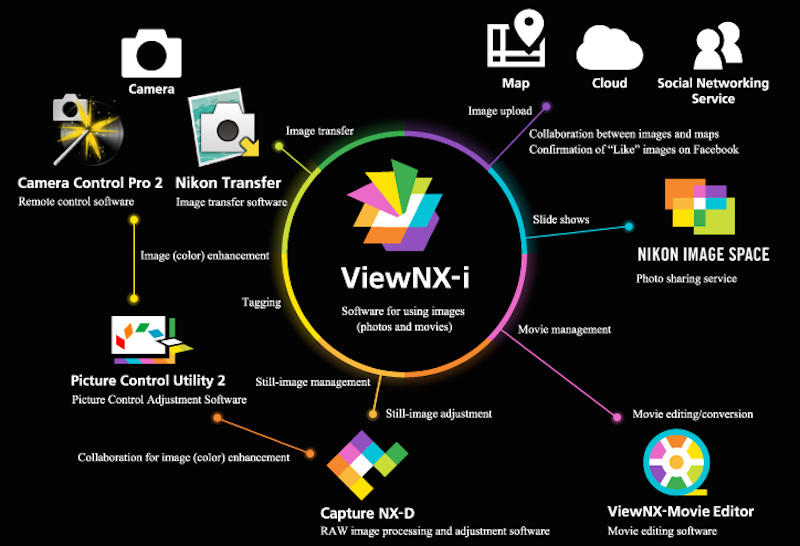
Nikon’s new image browsing software called ViewNX-i which is the successor application to the ViewNX 2 announced in the beginning of March and as stated it is now available for download.
Nikon’s new ViewNX-i image-browsing software is designed to enable use of still images and movies recorded with a Nikon digital camera.
ViewNX‑i software can map where photos were taken based on embedded location data and can be used with social networking and other web services. The bundled ViewNX Movie Editor makes processing and editing your movies a snap. ViewNX‑i also works with Capture NX-D (version 1.2.0 or later), which can be used to save NEF/NRW (RAW) images in other formats and to make adjustments to photos in all supported formats, including JPEG and TIFF.
Nikon ViewNX-i software available for download
| Windows OS System Requirements | |
| Supported operating systems | Pre-installed versions of Windows® 8.1, Windows 8.1 Pro/Enterprise, and Windows® 7 Home Premium/Professional/Enterprise/Ultimate (Service Pack 1).Compatible with 64- and 32-bit editions, respectively.
ViewNX‑i and ViewNX-Movie Editor run as native 64-bit applications under 64-bit editions of Windows. |
| CPU | • Photos:1.6 GHz Intel Celeron, Pentium 4, or Core i-series or better• Movies (playback):3.0 GHz Pentium D or better; Intel Core i5 or better recommended for HD and Full HD playback
• Movies (editing): Intel Core i5 or better |
| RAM | • 32-bit systems:1 GB or more (2 GB or more recommended)• 64-bit systems:2 GB or more (4 GB or more recommended) |
| Hard disk space | A minimum of 1 GB available on the startup disk (3 GB or more recommended) |
| Graphics | • Resolution:1024 × 768 pixels (XGA) or more (1366 × 768 or more recommended)• Color:24-bit color (True Color) or more |
| Download | • Interface: Built-in USB port required. Software may not function as expected if camera is connected via a USB hub.• Camera: Nikon digital camera with support for MTP/PTP, PTP, or Mass Storage |
| Supported file formats | JPEG images (Exif 2.2–2.3); NEF/NRW (RAW), MPO (3D), TIFF images, movies, audio, Image Dust Off data, location data, and altitude/depth log data created with Nikon digital cameras; NEF/NRW (RAW), TIFF (RGB), and JPEG (RGB) images and MOV and AVI movies saved with Nikon software (for more information on supported formats, see ViewNX‑i online help) |
| Miscellaneous | An Internet connection is required for: online help, location mapping, web services, movie-related functions (including ViewNX-Movie Editor), and software updates |
| Mac OS X System Requirements | |
| Supported operating systems | 64-bit editions of OS X 10.8.5, 10.9.5, 10.10.2 (OS X 10.9.5 or 10.10.2 required for ViewNX-Movie Editor) |
| CPU | • Photos: Intel Core or Xeon series• Movies (playback):2 GHz Core Duo or better; Intel Core i5 or better recommended for HD and Full HD playback
• Movies (editing): Intel Core i5 or better |
| RAM | 2 GB or more (4 GB or more recommended) |
| Hard disk space | A minimum of 1 GB available on the startup disk (3 GB or more recommended) |
| Graphics | • Resolution:1024 × 768 pixels (XGA) or more (1366 × 768 or more recommended)• Color:24-bit color (millions of colors) or more |
| Download | • Interface: Built-in USB port required. Software may not function as expected if camera is connected via a USB hub.• Camera: Nikon digital camera with support for MTP/PTP, PTP, or Mass Storage |
| Supported file formats | JPEG images (Exif 2.2–2.3); NEF/NRW (RAW), MPO (3D), TIFF images, movies, audio, Image Dust Off data, location data, and altitude/depth log data created with Nikon digital cameras; NEF/NRW (RAW), TIFF (RGB), and JPEG (RGB) images and MOV and AVI movies saved with Nikon software (for more information on supported formats, see ViewNX‑i online help) |
| Miscellaneous | An Internet connection is required for: online help, location mapping, web services, movie-related functions (including ViewNX-Movie Editor), and software updates |
You can select your region and language and download the software from the selected page through this link. You can also use the download center for the Nikon ViewNX-i software here.







