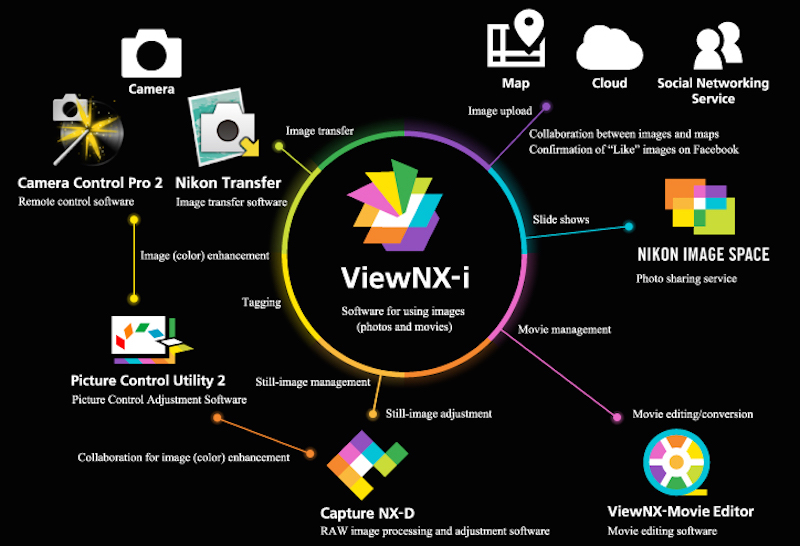
Nikon announced a new image browsing software called ViewNX-i which is the successor application to the ViewNX 2 image-browsing and editing software Nikon has offered to date.
Nikon’s new ViewNX-i image-browsing software is designed to enable use of still images and movies recorded with a Nikon digital camera.
Nikon to initiate free download of its new image browsing software ViewNX-i on March 17, 2015. You will be able to download this software through this link.
Nikon ViewNX-i software announced
ViewNX-i Primary Features
- Quick switching between the browser, map display, and Web services using tabs
- An Output Toolbar that enables quick access to easy-to-use functions, including image editing with Capture NX-D, movie editing with ViewNX-Movie Editor, printing, and image upload
- A variety of display formats, including vertical and horizontal thumbnail display and display of two images for comparison, that can be easily used as needed
- Simple shooting information display with a layout familiar to users of digital SLR cameras
- Photo Tray function in which still images and movies from multiple folders can be temporarily stored for quick and easy access
- Smooth upload of files to Facebook, YouTube, and NIKON IMAGE SPACE
- Flexible RAW development and image adjustment using Capture NX-D, which can be accessed directly from ViewNX-i (collaboration between the two applications will be strengthened with the addition of a button that returns operation to ViewNX-i to Capture NX-D Ver. 1.2.0 and later)
- Support for the sidecar file format for movies enables the application of ratings and specification of playback range without modifying the original movie file
- Movie editing functions that enable creation of original movies, movie trimming, combining of multiple photos and movies into a single movie, and saving of individual movie frames as still images with simple operations (collaboration with ViewNX-Movie Editor)
ViewNX-i System Requirements
Windows
| OS | Pre-installed versions of Windows 8.1 /Pro/Enterprise, and Windows® 7 Home Premium/Professional/Enterprise/Ultimate (Service Pack 1) Compatible with 64- and 32-bit editions, respectively ViewNX-i and ViewNX-Movie Editor run as native 64-bit applications under 64-bit editions of Windows. |
|---|---|
| CPU | 1.6-GHz or better Intel Celeron/Pentium 4/Core series |
| Memory (RAM) | 1 GB or more (2 GB or more recommended) under 32-bit operating systems, 2 GB or more (4 GB or more recommended) under 64-bit operating systems |
| Hard-disk | 1 GB or more free space on the start-up disk required to launch the application, 3 GB or more required during use |
| Monitor resolution | 1024 x 768 pixels or more (1,366 x 768 pixels or more recommended) with 24-bit color or better |
Macintosh
| OS | OS X versions 10.8.5, 10.9.5, 10.10.1 (however, OS X version 10.9.5 or 10.10.1 is required to use ViewNX-Movie Editor) |
|---|---|
| CPU | Intel Core series/Xeon series |
| Memory (RAM) | 2 GB or more (4 GB or more recommended) |
| Hard-disk | 1 GB or more free space on the start-up disk required to launch the application, 3 GB or more required during use |
| Monitor resolution | 1024 x 768 pixels or more (1,366 x 768 pixels or more recommended) with millions of colors or better |

See More DCN on Google
Add Daily Camera News as a trusted source to see our latest camera reviews, deal alerts, and photography news first in Google Search.
Explore Recommended Gear
Looking for the best cameras, lenses, and accessories? Check out our curated, hand-picked gear lists on Amazon.