Firmware Release: Tamron 28-75mm f/2.8 G2 (Nikon Z) Ver. 3
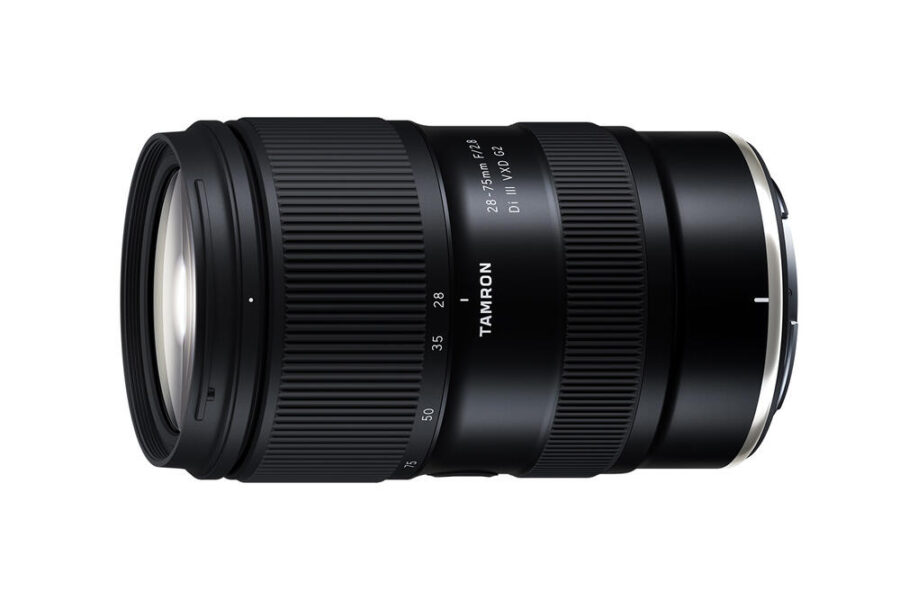
Tamron has officially released a new firmware update for its popular standard zoom lens for full-frame mirrorless cameras, the Tamron 28-75mm f/2.8 Di III VXD G2 (Model A063) for Nikon Z mount. Firmware version 3 brings compatibility with Tamron’s latest customization ecosystem, unlocking wireless lens control and mobile software enhancements.
While Sony E-mount shooters received this upgrade earlier in the year, Nikon Z photographers can now finally take advantage of Tamron’s newest lens management tools. For a complete overview of what the wireless hardware brings to solo video creators and photographers, check out our detailed guide on the TAMRON-LINK wireless accessory and Lens Utility v5.0 update.
What’s New in Tamron 28-75mm f/2.8 G2 Firmware Ver. 3?
This release focuses strictly on software and accessory interoperability rather than optical or autofocus changes. By updating to Version 3, Nikon Z owners gain access to new tools inside the updated desktop and mobile apps:
Changelog & Key Improvements
- TAMRON Lens Utility Ver. 5.0 Support: Enables full communication with the latest desktop software for Windows and macOS.
- TAMRON Lens Utility Mobile Ver. 5.0 Support: Unlocks new mobile interface capabilities on iOS and Android devices.
- TAMRON-LINK™ Compatibility: Allows the lens to pair with Tamron’s compact Bluetooth accessory (Model TL-01) for wireless focus pulling and customization from up to 5 meters away.
Important Compatibility Note for Nikon Z Users: While Firmware Ver. 3 unlocks mobile app control and features like Astro Focus Lock and Night Mode, please note that three specific Lens Utility 5.0 features—Focus/Iris Marker Link, Ring Stopper, and Focus Time Lapse—are currently not supported on the Nikon Z-mount version of this lens.
Official Download & Support Links: You can access the firmware and desktop utility directly from Tamron’s official support pages:
- Download official Tamron 28-75mm F/2.8 Di III VXD G2 (Nikon Z) Firmware Ver. 3
- Official Tamron Europe Firmware Release Notice
- Need local assistance? Contact your local TAMRON distributor
How to Install the Firmware Update
Updating third-party third-party lenses via Tamron’s built-in USB-C port is quick and does not require a camera body. Follow these official steps:
- Download and install the latest desktop version of TAMRON Lens Utility on your Windows (Windows 11 64-bit) or macOS computer.
- Detach the 28-75mm f/2.8 G2 lens from your Nikon Z camera body.
- Connect the lens directly to your computer using a compatible USB cable (such as the Tamron CC-150 USB-A to USB-C or CC-350 USB-C to USB-C cable) plugged into the lens’s built-in USB-C connector port.
- Launch the TAMRON Lens Utility software and allow it to detect your connected lens.
- Follow the on-screen prompts to download and apply Firmware Version 3.
- Keep the USB cable firmly connected until the software confirms the update is complete. Note that once updated to Ver. 3, the lens cannot be downgraded to an earlier firmware version.
Should You Update?
If you use—or plan to use—the TAMRON Lens Utility desktop software, mobile app, or the wireless TAMRON-LINK Bluetooth adapter to customize your focus ring behavior and Focus Set Button, updating to Version 3 is mandatory. However, if you never connect your lens to a computer or smartphone app, you will not notice any changes in optical sharpness or autofocus speed, as this update makes no modifications to imaging performance.
Price & Availability
The Tamron 28-75mm f/2.8 Di III VXD G2 (Model A063) for Nikon Z remains one of the strongest high-value f/2.8 standard zooms on the market. Check out current seasonal discounts in our roundup of Tamron holiday savings, or compare store prices directly below:
Looking for more native and third-party glass for your mirrorless kit? Explore our lenses section for in-depth reviews, sample galleries, and optical comparisons across Nikon Z-mount gear.
Summary
Tamron Firmware Version 3 brings the Nikon Z-mount version of the 28-75mm f/2.8 Di III VXD G2 up to speed with Tamron Lens Utility / Mobile 5.0 and the wireless TAMRON-LINK ecosystem. While three advanced mobile functions remain exclusive to Sony E-mount for now, Nikon Z creators still gain valuable wireless control and customization options. Connect your lens to a PC or Mac via USB-C to install the free update today.
Stay tuned for more firmware news and photography updates here on DCN.
Frequently Asked Questions (FAQ)
Q: What does Tamron 28-75mm f/2.8 G2 (Nikon Z) firmware version 3 add?
A: Firmware Ver. 3 adds compatibility with TAMRON Lens Utility Ver. 5.0, TAMRON Lens Utility Mobile Ver. 5.0, and the wireless TAMRON-LINK Bluetooth accessory.
Q: Can I update my Tamron lens firmware through my Nikon Z camera or smartphone app?
A: No, Tamron lens firmware updates must be installed using a Windows or Mac computer connected via USB-C to the lens’s built-in connector port using the desktop TAMRON Lens Utility software.
Q: Does firmware version 3 improve autofocus speed or optical sharpness?
A: No, Version 3 is strictly a compatibility update for Tamron’s software and wireless accessory ecosystem and does not alter autofocus or optical performance.

See More DCN on Google
Add Daily Camera News as a trusted source to see our latest camera reviews, deal alerts, and photography news first in Google Search.
Explore Recommended Gear
Looking for the best cameras, lenses, and accessories? Check out our curated, hand-picked gear lists on Amazon.