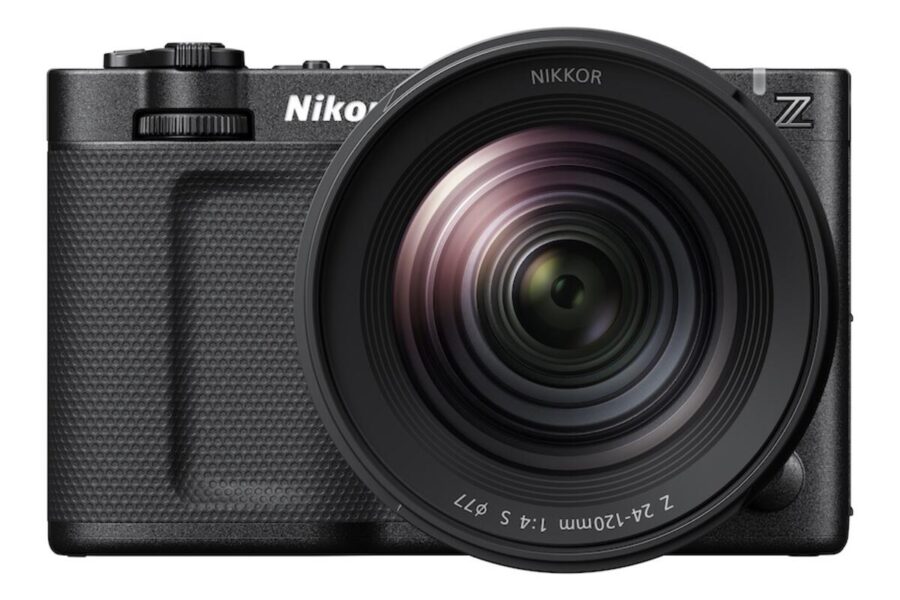
Firmware Announcement: Nikon ZR v2.00
Nikon has officially announced the upcoming release of major firmware update version 2.00 for the Nikon ZR full-frame Z CINEMA series camera. Originally launched in October 2025 as Nikon’s dedicated entry into full-frame cinema bodies, the ZR is set to receive its first substantial software evolution before the end of the year.
The standout headline of version 2.00 is the integration of RED Digital Cinema color science when shooting in compact H.265 video formats, directly bridging Nikon’s cinema ecosystem with high-end post-production color pipelines. To read more about how this cinema body fits into the broader mirrorless line, explore our comprehensive Nikon Z system guide.
What’s New in Nikon ZR Firmware 2.00?
Firmware version 2.00 delivers essential professional upgrades covering color science, exposure controls, monitoring flexibility, and physical button customization.
Changelog & Key Features
- RED Color Science for H.265: Adds Log3G10 gamma to tone mode options when recording in H.265, allowing filmmakers to capture footage within the REDWideGamutRGB color space with exceptionally wide dynamic range and smooth color grading latitude.
- Selectable High ISO Noise Reduction: Introduces four adjustable [High ISO NR] levels when shooting in Log3G10 or N-Log in H.265 mode, giving creators control over noise suppression versus organic image texture.
- Enhanced Command Dial Controls: Quick assignment of ISO sensitivity, exposure controls, White Balance (WB), and White Balance Color Temperature (WBK) directly to the command dials.
- Single-Touch Fn Button Mapping: Assign [3D LUT/View Assist] to any Fn button to toggle monitoring profiles on the fly without taking your eyes off the LCD or EVF.
- Focus Peaking for R3D NE Formats: Adds focus peaking overlay support during 3D LUT preview when recording in RAW R3D NE format.
- 3D LUT for HDMI Video Output: Enables applying a custom 3D LUT directly to external monitor feeds connected via HDMI.
- Low-Light Black Level Flicker Reduction: Implements backend signal processing that suppresses frame-by-frame black level fluctuations in shadow areas during low-light shooting.
Official Release Page: You can read the official announcement press details directly on Nikon’s portal:
- Official Announcement on Nikon USA Press Room
For more news, field tests, and video workflow tutorials dedicated to this full-frame cinema body, check out our tag index for the Nikon ZR page.
How to Install the Firmware Update
Once firmware version 2.00 is officially made available for download by Nikon, updating your cameras takes only a few minutes:
- Download the version 2.00 firmware package (
.binfile) from the official Nikon Download Center. - Format a supported CFexpress or SD memory card inside your Nikon ZR camera body.
- Copy the downloaded
.binfile directly to the top-level (root directory) of your memory card using a card reader. - Insert the memory card into Slot 1 of your camera along with a fully charged EN-EL15c battery (or connect to continuous USB-C power).
- Turn on the camera, navigate to SETUP MENU > Firmware version, and select Update.
- Follow the on-screen prompts and keep power on until the camera screen confirms the process is finished.
Should You Update?
Yes, absolutely. For professional filmmakers, video journalists, and narrative creators, firmware 2.00 transforms the Nikon ZR into a much stronger multi-camera B-cam alongside RED digital cinema rigs. The combination of HDMI 3D LUT monitoring, focus peaking in R3D NE recording, and customizable dial control significantly elevates field usability.
If you are looking to expand your lens kit to pair with the ZR cinema body, explore current savings across prime and zoom lenses in our guide to Nikon fall rebates on 14-24mm and 24-70mm glass.
Price & Availability
The Nikon ZR full-frame Z CINEMA camera body retails for $2,196.95. Firmware update version 2.00 will be released completely free of charge to all existing and new owners before the end of the year.
Looking for current deals on Nikon mirrorless gear?
Check out our updated selection of Nikon Black Friday deals to find active price drops on full-frame bodies, Z-mount cinema lenses, and accessories.
Summary
Nikon ZR firmware version 2.00 marks a major milestone for Nikon’s dedicated cinema camera line. By bringing Log3G10 gamma and REDWideGamutRGB color spaces to compact H.265 recording, Nikon gives creators high-latitude RED color science in manageable file sizes. Combined with 3D LUT HDMI output, R3D NE focus peaking, and improved low-light black level processing, update 2.00 reinforces the Nikon ZR as a powerful tool for modern digital filmmaking.
Stay tuned for more firmware news and photography updates here on DCN.
Frequently Asked Questions (FAQ)
Q: What is the main highlight of Nikon ZR firmware version 2.00?
A: Firmware 2.00 adds support for Log3G10 gamma when recording in H.265, enabling RED color science and REDWideGamutRGB color space in compact file formats.
Q: Can I output a 3D LUT to an external monitor on the Nikon ZR with v2.00?
A: Yes, version 2.00 adds support for applying 3D LUTs directly to external video monitors via the camera’s HDMI output.
Q: When will Nikon ZR firmware update 2.00 be available for download?
A: Nikon has announced that firmware 2.00 will be released as a free download before the end of the year.

See More DCN on Google
Add Daily Camera News as a trusted source to see our latest camera reviews, deal alerts, and photography news first in Google Search.
Explore Recommended Gear
Looking for the best cameras, lenses, and accessories? Check out our curated, hand-picked gear lists on Amazon.