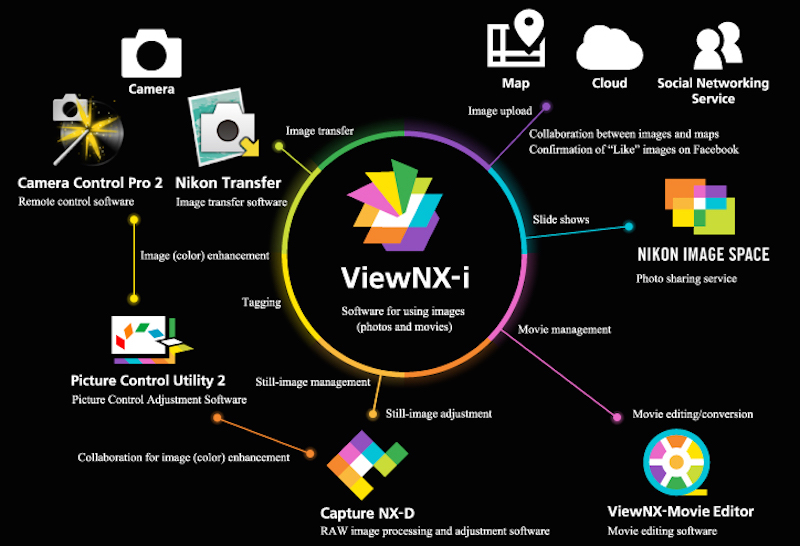
Nikon announced a new image browsing software called ViewNX-i which is the successor application to the ViewNX 2 image-browsing and editing software Nikon has offered to date.
Nikon’s new ViewNX-i image-browsing software is designed to enable use of still images and movies recorded with a Nikon digital camera.
Nikon to initiate free download of its new image browsing software ViewNX-i on March 17, 2015. You will be able to download this software through this link.
Nikon ViewNX-i software announced
ViewNX-i Primary Features
- Quick switching between the browser, map display, and Web services using tabs
- An Output Toolbar that enables quick access to easy-to-use functions, including image editing with Capture NX-D, movie editing with ViewNX-Movie Editor, printing, and image upload
- A variety of display formats, including vertical and horizontal thumbnail display and display of two images for comparison, that can be easily used as needed
- Simple shooting information display with a layout familiar to users of digital SLR cameras
- Photo Tray function in which still images and movies from multiple folders can be temporarily stored for quick and easy access
- Smooth upload of files to Facebook, YouTube, and NIKON IMAGE SPACE
- Flexible RAW development and image adjustment using Capture NX-D, which can be accessed directly from ViewNX-i (collaboration between the two applications will be strengthened with the addition of a button that returns operation to ViewNX-i to Capture NX-D Ver. 1.2.0 and later)
- Support for the sidecar file format for movies enables the application of ratings and specification of playback range without modifying the original movie file
- Movie editing functions that enable creation of original movies, movie trimming, combining of multiple photos and movies into a single movie, and saving of individual movie frames as still images with simple operations (collaboration with ViewNX-Movie Editor)
ViewNX-i System Requirements
Windows
| OS | Pre-installed versions of Windows 8.1 /Pro/Enterprise, and Windows® 7 Home Premium/Professional/Enterprise/Ultimate (Service Pack 1) Compatible with 64- and 32-bit editions, respectively ViewNX-i and ViewNX-Movie Editor run as native 64-bit applications under 64-bit editions of Windows. |
|---|---|
| CPU | 1.6-GHz or better Intel Celeron/Pentium 4/Core series |
| Memory (RAM) | 1 GB or more (2 GB or more recommended) under 32-bit operating systems, 2 GB or more (4 GB or more recommended) under 64-bit operating systems |
| Hard-disk | 1 GB or more free space on the start-up disk required to launch the application, 3 GB or more required during use |
| Monitor resolution | 1024 x 768 pixels or more (1,366 x 768 pixels or more recommended) with 24-bit color or better |
Macintosh
| OS | OS X versions 10.8.5, 10.9.5, 10.10.1 (however, OS X version 10.9.5 or 10.10.1 is required to use ViewNX-Movie Editor) |
|---|---|
| CPU | Intel Core series/Xeon series |
| Memory (RAM) | 2 GB or more (4 GB or more recommended) |
| Hard-disk | 1 GB or more free space on the start-up disk required to launch the application, 3 GB or more required during use |
| Monitor resolution | 1024 x 768 pixels or more (1,366 x 768 pixels or more recommended) with millions of colors or better |
Press text can be seen here on Nikon Official website.







