Service Advisory: Canon Extender RF 1.4x & RF 2x
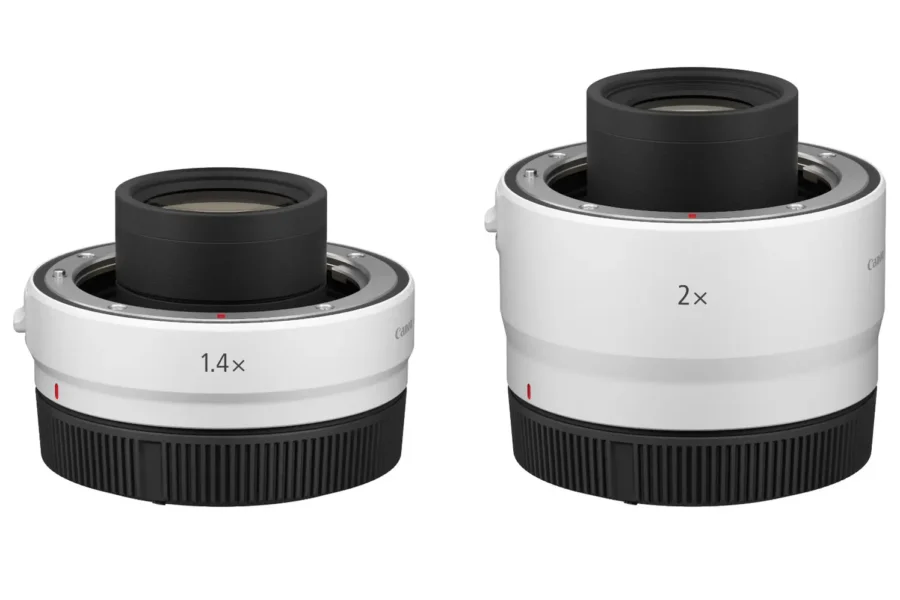
Canon has officially issued an urgent product service notice for owners of the Extender RF 1.4x and Extender RF 2x teleconverters. The advisory warns photographers of a potential mechanical defect in the extender’s lens-locking mechanism that could prevent an attached RF lens from locking securely—creating a serious risk of expensive telephoto glass detaching unexpectedly during use.
Because these teleconverters are typically paired with heavy super-telephoto lenses for wildlife, sports, and birding, verifying that your mount locks properly is critical before heading out into the field. To explore compatible optics and native glass for your mirrorless setup, browse our Canon news and gear coverage.
What’s the Issue in the Canon RF Extender Service Notice?
According to Canon’s official advisory, no specific serial number range or production batch has been isolated, meaning all owners of the Extender RF 1.4x and RF 2x should inspect their units. If the locking pin fails to seat completely into the lens mount recess, the lens may feel attached initially without actually being locked in place.
Key Warning Signs & Official Guidance
- Incomplete Lens Locking: An RF lens mounted to the teleconverter may fail to lock securely even after rotating it into position.
- Stiff or Catching Release Lever: When pressing the white lens release lever on the side of the extender, it may feel stiff, sticky, or catch on internal components rather than depressing smoothly.
- Risk of Lens Detachment: Continuing to shoot with a stiff or catching release lever can result in the attached RF lens coming loose and falling off the teleconverter.
Official Service Advisory & Support Links: You can read the complete service notice and submit a repair request directly through Canon’s support center:
How to Check Your RF Teleconverter
Before mounting super-telephoto lenses onto your Extender RF 1.4x or RF 2x, perform this quick mechanical safety check recommended by Canon:
- Mount and Rotate: Align the red index dots, attach your compatible RF lens onto the teleconverter, and rotate it firmly until you hear and feel a distinct locking click.
- Perform the Reverse-Twist Test: Without touching the white lens release lever, gently attempt to twist the lens counter-clockwise (in the removal direction). The lens must remain completely rigid with zero rotational play.
- Test the Release Lever Action: Press the white lens release lever slowly several times while unmounting and remounting. Confirm that the lever depresses smoothly and springs back cleanly on its own without any stiffness, grinding, or catching.
- Stop Use if Abnormal: If the lever feels stiff or catches even once out of several tries, detach the gear over a soft surface and refrain from using the teleconverter until it is serviced.
Should You Send Your Extender to Canon?
Yes, if you notice even slight stiffness or irregular resistance in the release lever. Canon is offering free inspections and repairs through its authorized service centers for affected Extender RF 1.4x and RF 2x units. Given the high value of compatible RF telephoto lenses—such as the RF 100-500mm f/4.5-7.1L, RF 70-200mm f/2.8L Z, and RF super-telephoto primes—taking advantage of Canon’s complimentary repair program eliminates the risk of a catastrophic drop.
Canon also encourages owners to register their teleconverters in their MyCanon account so they receive direct email notifications if any follow-up advisories are issued.
Price & Availability
Both the Canon Extender RF 1.4x and Extender RF 2x remain available at major photography retailers for shooters looking to extend the reach of compatible RF telephoto lenses. Check current store pricing and availability below:
Shopping for Canon mirrorless gear and accessories?
Check out our latest roundup of Black Friday camera deals to find active discounts on cameras, RF lenses, and essential accessories.
Canon Extender RF 2x – Check Store Prices & Availability:
Summary
Canon’s service notice for the Extender RF 1.4x and RF 2x teleconverters serves as a vital reminder to inspect your mount locking mechanism before shooting. If the white lens release lever feels stiff, catches, or fails to move smoothly, the attached lens may not be securely locked and could detach during operation. Stop using any affected unit immediately and contact your regional Canon authorized service center to arrange a free inspection and repair.
Stay tuned for more firmware news and photography updates here on DCN.
Frequently Asked Questions (FAQ)
Q: Which Canon teleconverters are covered by this service notice?
A: The service notice applies to both the Canon Extender RF 1.4x and the Canon Extender RF 2x. Canon has not limited the advisory to a specific serial number range.
Q: How can I tell if my RF extender has the locking mechanism problem?
A: When attaching an RF lens, check that it locks firmly without rotational play, and press the white lens release lever several times. If the lever feels stiff, sticky, or catches instead of moving smoothly, your unit may be affected.
Q: Does Canon charge to inspect or repair affected RF 1.4x and RF 2x extenders?
A: No, Canon is offering free inspections and repairs through its authorized service centers for extenders exhibiting this locking mechanism issue.

See More DCN on Google
Add Daily Camera News as a trusted source to see our latest camera reviews, deal alerts, and photography news first in Google Search.
Explore Recommended Gear
Looking for the best cameras, lenses, and accessories? Check out our curated, hand-picked gear lists on Amazon.